
01Website design
- Quantity
- 1
- Rate
- 1,200.00
- Amount
- 1,200.00
A document is the starting point. Your review is the part that matters. Explore a sample workspace built around both.
Explore FeaturesA new product. Real extraction is in development.
Tables carry meaning in their layout. An item, quantity, and price belong on the same row, and column headings need to stay attached to their values. SheetSnapshot is designed around that structure.
The sample demonstrates a structured review grid. A production OCR provider must be connected before real images can be extracted. Always compare the result with the original document.
Try it in the demo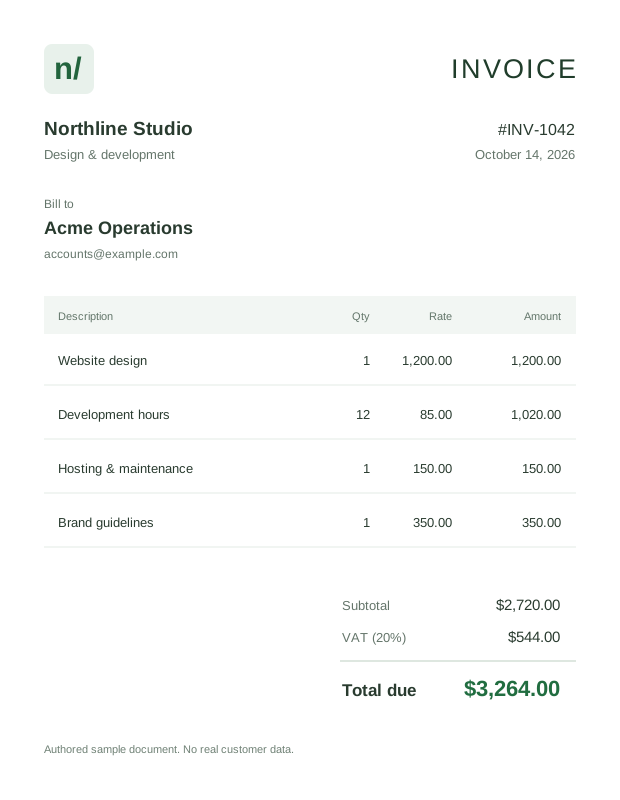
| A | B | C | D | |
|---|---|---|---|---|
| 1 | Description | Qty | Rate | Amount |
| 2 | Website design | 1 | 1,200.00 | 1,200.00 |
| 3 | Development hours | 12 | 85.00 | 1,020.00 |
| 4 | Hosting & maintenance | 1 | 150.00 | 150.00 |
| 5 | Brand guidelines | 1 | 350.00 | 350.00 |
| 6 | Total incl. VAT | 3,264.00 | ||
| 7 |
Animated sample workflow. Real document extraction is in development.
Use a clear, well-lit image with the full table in frame. Printed descriptions and numeric columns can then be checked together instead of copied into separate files.
Small fonts, blur, and unusual separators can affect the result. Review amounts, dates, decimal separators, and identifiers before using an exported file. Handwriting is on the roadmap.
Try it in the demo| A | B | C | D | |
|---|---|---|---|---|
| 1 | Description | Qty | Rate | Amount |
| 2 | ||||
| 3 | ||||
| 4 | ||||
| 5 | ||||
| 6 | Total incl. VAT | |||
| 7 |
Animated sample workflow. Real document extraction is in development.
The original invoice stays beside the extracted grid, so a questionable value can be checked in context. Amber cells in the demo show where a second look would be useful.
Click any cell to edit its value. Accepting the sample review clears the visual reminders; it does not guarantee that the data is correct. Financial totals should always be reconciled.
Try it in the demo| A | B | C | D | |
|---|---|---|---|---|
| 1 | Description | Qty | Rate | Amount |
| 2 | Website design | 1 | 1,200.00 | 1,200.00 |
| 3 | Development hours | 12 | 8S.00 | 1,020.00 |
| 4 | Hosting & maintenance | 1 | 150.00 | 150.00 |
| 5 | Brand guidelines | 1 | 350.00 | 350.00 |
| 6 | Total incl. VAT | 3,264.00 | ||
| 7 |
Animated sample workflow. Real document extraction is in development.
Download the reviewed demo as an Excel workbook or a UTF-8 CSV. The workbook preserves numeric values where possible and includes the edited cell contents.
CSV files open in most spreadsheet applications. Values that could be interpreted as spreadsheet formulas are escaped for a safer export. A direct Google Sheets connection is on the roadmap.
Try it in the demo| A | B | C | D | |
|---|---|---|---|---|
| 1 | Description | Qty | Rate | Amount |
| 2 | Website design | 1 | 1,200.00 | 1,200.00 |
| 3 | Development hours | 12 | 85.00 | 1,020.00 |
| 4 | Hosting & maintenance | 1 | 150.00 | 150.00 |
| 5 | Brand guidelines | 1 | 350.00 | 350.00 |
| 6 | Total incl. VAT | 3,264.00 | ||
| 7 |
Animated sample workflow. Real document extraction is in development.
Look at the source, understand its layout, and check the values that matter to your work.

Descriptions, quantities, unit rates, and tax. Keep each value connected to its source.
Explore the document guide
Check the small print, discounts, and paid totals before using the numbers.
Explore the document guide
Preserve headings and row order when bringing a printed report into spreadsheet work.
Explore the document guideFollow the export sequence, then download the reviewed sample. XLSX keeps editable cells and numeric values. CSV is a practical option for existing spreadsheet tools.
These controls create a real sample file on your device. The animation does not run OCR on a document.
Explore the sample workspace| A | B | C | D | |
|---|---|---|---|---|
| 1 | Description | Qty | Rate | Amount |
| 2 | Website design | 1 | 1,200.00 | 1,200.00 |
| 3 | Development hours | 12 | 85.00 | 1,020.00 |
| 4 | Hosting & maintenance | 1 | 150.00 | 150.00 |
| 5 | Brand guidelines | 1 | 350.00 | 350.00 |
| 6 | Total incl. VAT | 3,264.00 | ||
| 7 |
Animated sample workflow. Real document extraction is in development.
Keep the full table in frame, choose even lighting, and make small numbers readable. A photograph cannot recover text that is missing from the source.