Skip to content
SheetSnapshot.
Features
PricingSecurityFAQOpen workspaceLog in
Log inOpen workspace
A practical document workflow

Receipt to Excel

Review receipt items before adding them to an expense sheet.

Browser demo · Sample extraction data

Drop your image here

Choose a JPG or PNG for a local preview.

JPG, PNG · Up to 20 MB
No file handy?Open sample workspace

A useful spreadsheet starts
with a good source.

Thermal receipts fade, curve, and often use abbreviated descriptions. A clear photo and careful review help distinguish a quantity from a price, and a discount from a tax line.

For example: an office-supply receipt with paper, ink, a discount, and sales tax.
Hands holding paper receipts and checking expenses with a calculator.
Photo by Kaboompics.com / Pexels

Your workflow

  1. 1Flatten the receipt and photograph it in even light.
  2. 2Check item descriptions and discounts in the sample grid.
  3. 3Confirm the paid total, categorize your expenses, and export.
See the sample workflow

Keep the source beside the values.

Animated sample data. Use the original document as a reference while you review the sample.
SheetSnapshot Product walkthroughSample data
Invoice #10424 line items · USD
In review
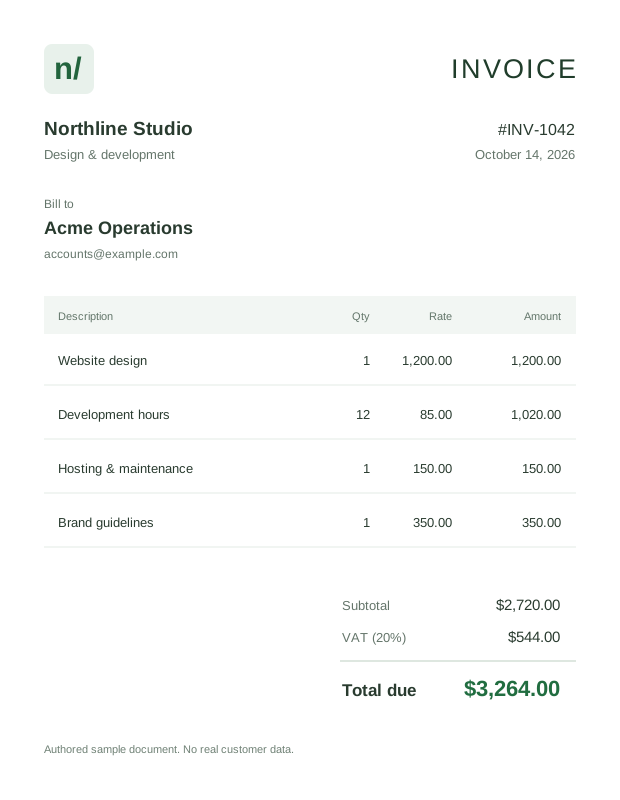
View original sample documentAuthored sample invoice 1042 with four service line items, subtotal 2720 dollars, VAT 544 dollars, and total 3264 dollars.
Cell C3 needs a closer lookS or 5?
01Website design
Quantity
1
Rate
1,200.00
Amount
1,200.00
02Development hours
Quantity
12
Rate
8S.00
Amount
1,020.00
View the other 2 line items
Hosting & maintenance150.00
Brand guidelines350.00
Total incl. VAT$3,264.00
invoice_1042.jpg1 page
Authored sample invoice 1042 with four service line items, subtotal 2720 dollars, VAT 544 dollars, and total 3264 dollars.
Source remains in view
Reviewed tableIn progress
fx8S.00C3
ABCD
1DescriptionQtyRateAmount
2Website design11,200.001,200.00
3Development hours128S.001,020.00
4Hosting & maintenance1150.00150.00
5Brand guidelines1350.00350.00
6Total incl. VAT3,264.00
7
Is this an S or a 5?Original rate: $85.00. The sample will correct this cell.
Inspect a value

Animated sample workflow. Real document extraction is in development.

Get a cleaner result

Avoid flash reflections on glossy receipts.

Include the bottom of the receipt where tax and totals appear.

Use a minus sign for discounts after checking the original.

Good questions, clear answers

Questions about Receipt to Excel

Still have a question?
We’re here to help.

A closer look at the workflow

See your data
from another angle.

Open an illustrative invoice. Check the cells. Download your edits.

Open sample workspace
SheetSnapshot.

A considered document-to-spreadsheet workflow.

Business details are being finalized. Paid subscriptions are not open.

Product

  • Features
  • Pricing

Company

  • About
  • Careers
  • Contact

Legal

  • Privacy Policy
  • Terms of Service
  • Security
  • Cookie Policy
  • Refund Policy
© 2026 SheetSnapshot. All rights reserved.A new product for document work.