A practical document workflow

Image to Excel

Bring the rows and columns in an image into an editable spreadsheet workflow.

Browser demo · Sample extraction data

Drop your image here

Choose a JPG or PNG for a local preview.

JPG, PNG · Up to 20 MB
No file handy?Open sample workspace

A useful spreadsheet starts
with a good source.

A table embedded in an image is difficult to sort or calculate. SheetSnapshot pairs a document preview with an editable grid so you can check the structure before using the data.

For example: a PNG table copied from a report, with department names and quarterly spending.
A laptop, notebook and printed financial documents on a working desk.
Photo by Leeloo The First / Pexels

Your workflow

  1. 1Upload a JPG or PNG with one clearly visible table.
  2. 2Check the extracted layout in the sample review workspace.
  3. 3Correct headings and values, then download XLSX or CSV.
See the sample workflow

Keep the source beside the values.

Animated sample data. Use the original document as a reference while you review the sample.
SheetSnapshot Product walkthroughSample data
Invoice #10424 line items · USD
In review
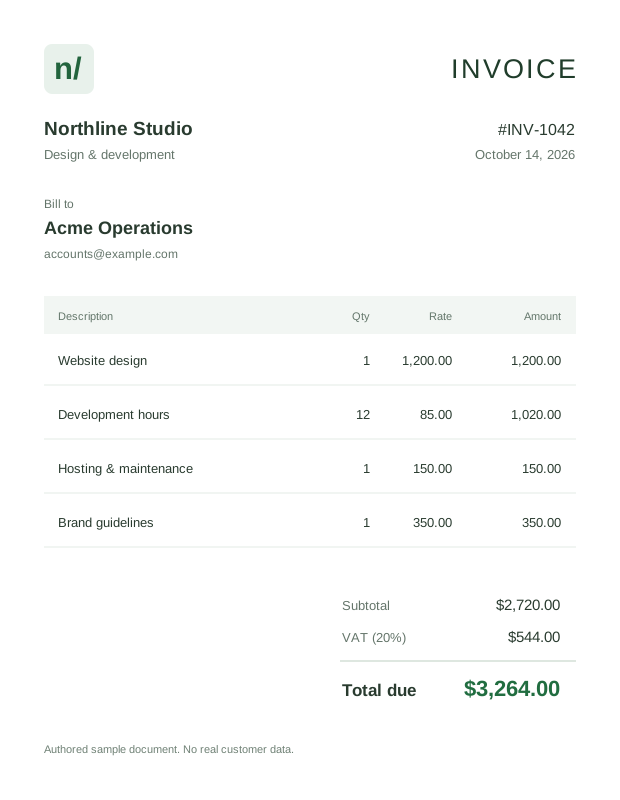
View original sample documentAuthored sample invoice 1042 with four service line items, subtotal 2720 dollars, VAT 544 dollars, and total 3264 dollars.
Line items arranged for reviewA readable table, one item at a time
01Website design
Quantity
1
Rate
1,200.00
Amount
1,200.00
02Development hours
Quantity
12
Rate
85.00
Amount
1,020.00
View the other 2 line items
Hosting & maintenance150.00
Brand guidelines350.00
Total incl. VAT$3,264.00
invoice_1042.jpg1 page
Authored sample invoice 1042 with four service line items, subtotal 2720 dollars, VAT 544 dollars, and total 3264 dollars.
4 columns
Source remains in view
Reviewed tableIn progress
fxSelect a cell to inspect
ABCD
1DescriptionQtyRateAmount
2Website design11,200.001,200.00
3Development hours1285.001,020.00
4Hosting & maintenance1150.00150.00
5Brand guidelines1350.00350.00
6Total incl. VAT3,264.00
7
A structure you can inspectKeep headings, line items, and amounts together.
Arrange the rows

Animated sample workflow. Real document extraction is in development.

Get a cleaner result

Crop away unrelated illustrations and captions.

Include column headings in your crop.

Check whether parentheses represent negative amounts.

Good questions, clear answers

Questions about Image to Excel

Still have a question?
We’re here to help.

A closer look at the workflow

See your data
from another angle.

Open an illustrative invoice. Check the cells. Download your edits.

Open sample workspace